Create my document
Login

Choose country

FranceBelgiqueEspañaUnited StatesUnited KingdomالمغربDeutschlandItalia
Employment

Remote Work Agreement Template | Protect Your Business (US)

Formalize work-from-home rules, equipment ownership, §2802 reimbursement and data security in minutes. Editable remote work agreement for US employers. Word & PDF.
4.8/536 reviews50 000+ downloadsInstant download
Share

A remote work agreement is the written document that converts a casual work-from-home arrangement into a defined employment term, setting out where the job is performed, who supplies and insures the equipment, how hours are tracked, and which expenses the company will cover. US employers use it the moment a role goes fully remote or hybrid, because federal wage law and a patchwork of state statutes both attach obligations the second an employee logs in from a kitchen table instead of an assigned desk. A clean work-from-home agreement protects the company on overtime, reimbursement, data security, and tax exposure, and it gives the employee a clear record of what was promised. This template is drafted to adjust across all 50 states, so a Texas-based company hiring a remote worker in California stays inside the stricter of the two rule sets.

Compliant

2026 Legislation

50,000+ clients

trust us

Affordable

From $4.90 / doc

Secure payment

Instant download

Remote Work Agreement Template | Protect Your Business (US)

Secure payment · No subscription

Fill in the template

What is a remote work agreement?

A remote work agreement is a written addendum or standalone contract that governs telework. It does not replace the underlying employment relationship; it layers onto an existing offer letter or at-will contract and answers the operational questions that an office job never had to: which days are remote, what counts as the official work location for tax and workers' compensation purposes, who owns the laptop, and how the company audits hours for non-exempt staff. People often confuse it with a generic telecommuting policy in a handbook. The difference is enforceability and specificity. A handbook policy states the company's general posture and can be revised unilaterally. A signed agreement creates mutual obligations the employee has actually consented to, which is exactly what California courts look for when an employer wants documented agreement on remote conditions.

The agreement also does work that a verbal arrangement cannot. When an employee moves to a different state without telling payroll, the company can suddenly owe income tax withholding, unemployment insurance, and benefits compliance in a jurisdiction it never registered in. A well-drafted agreement requires the employee to disclose and get written approval before relocating, which keeps a quiet move from becoming a registration and tax problem. For US employers building a broader hiring stack, this document sits alongside the at-will employment contract used to set the core terms of the role.

2

When do you need this document?

The clearest trigger is converting an in-office role to a permanent remote or hybrid schedule. Once the change is real, the company needs documented terms on hours, equipment, and expenses before the first paycheck cycle, because retroactive paperwork raises awkward questions about consideration and consent. The second common scenario is hiring a new employee who will be remote from day one, where the agreement rides alongside the offer letter and sets expectations before anyone gets comfortable with undocumented habits. A growing distributed team is the third: when one manager improvises a remote policy and another forbids it, the inconsistency itself becomes evidence in a discrimination or wage dispute.

Two edge cases deserve attention because they are where employers get burned. First, the employee who quietly relocates across state lines. A salesperson who moves from Nevada to California exposes the company to California's daily overtime rule, its §2802 reimbursement duty, and its tax registration requirements, often before HR even knows the address changed. A relocation-approval clause is the cheapest insurance you can buy here. Second, the cross-border or international remote worker, where US employment law may not even be the governing regime and permanent-establishment tax risk enters the picture. Companies that share sensitive systems with remote staff should pair this agreement with the cybersecurity and access provisions that also surface in a comprehensive privacy policy covering data handling obligations.

3

Key clauses included in our template

  • The designated work location and relocation clause records the employee's primary remote address and requires written approval before any move to a new state or country. This single provision controls a cascade of downstream issues: tax withholding, workers' compensation coverage, unemployment insurance, and which state's wage law governs. Without it, an unannounced move can create compliance obligations in a jurisdiction the company never registered in.
  • The equipment and ownership clause specifies what the company provides, what the employee supplies, and who retains title when the relationship ends. It pairs with a return-of-property obligation so a departing employee actually ships back the laptop and surrenders access credentials, which avoids the familiar fight over a $1,800 device that never came home.
  • The expense reimbursement clause sets the categories the company will cover and the submission process, calibrated to the strictest applicable state. For §2802 states it commits to a reasonable percentage of internet and phone costs; for other states it can default to the minimum-wage floor under the FLSA. The clause also fixes a submission deadline so stale claims do not pile up.
  • The hours, timekeeping, and overtime clause requires non-exempt employees to log actual hours and bars unapproved overtime and off-the-clock work, which protects the company on its core FLSA recordkeeping duty.
  • The cybersecurity and confidentiality clause obligates the employee to use company-approved devices, secured networks, and encryption, and to handle proprietary data under the same standards that apply in the office. This is what keeps trade-secret protection intact when the work happens on a home network.
  • The monitoring and privacy clause discloses any device management, activity logging, or email monitoring the company actually performs, because a policy that promises no monitoring while IT pulls logs is a credibility problem in any dispute.
4

State-specific considerations

California is the most demanding jurisdiction by a wide margin. Labor Code §2802 forces reimbursement of all necessary remote-work expenses, and courts since Cochran v. Schwan's Home Service have read that to cover a reasonable share of personal phone and internet even when the employee had an unlimited plan. California also imposes daily overtime after eight hours, not just weekly overtime after forty, so the timekeeping clause has to capture daily totals. Anti-discrimination and harassment duties under the Fair Employment and Housing Act follow the employee into the virtual workspace, and the employer must keep accurate hour records regardless of location.

Texas sits at the opposite end. The state has no statute requiring expense reimbursement beyond the FLSA floor, and it follows the federal overtime standard without a daily trigger. The practical risk for a Texas employer is the remote worker who lives in a stricter state, since the governing law tends to be where the work is physically performed, not where the company is headquartered. The agreement's relocation clause is the main defense against importing California or Illinois obligations by accident.

New York requires reimbursement of expenses that would otherwise drop pay below minimum wage and enforces its own wage-notice and pay-statement rules under the Wage Theft Prevention Act, which apply to remote employees based in the state. New York City layers on additional anti-discrimination protections. Florida, like Texas, has no broad reimbursement mandate and tracks the federal standard, so the heavy lifting there is documentation and consistency rather than statutory compliance. Across every state, the safe drafting rule is to comply with whichever law is most protective of the employee, which is precisely how this template behaves when you select the work location.

5

How to fill out this remote work agreement

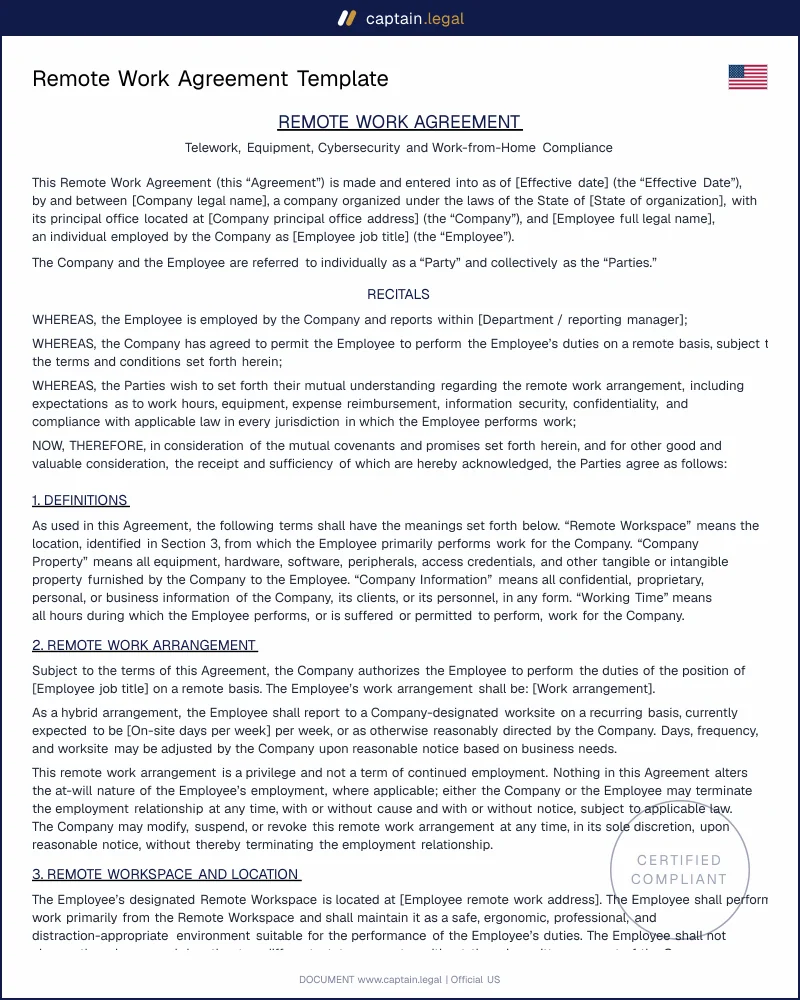
You start by entering the employer and employee details and then selecting the state where the employee actually performs the work, since that choice drives the reimbursement and overtime rules the rest of the form applies. From there you set the schedule, marking whether the arrangement is fully remote or hybrid and, for hybrid roles, which days are office-based. The form then asks you to classify the employee as exempt or non-exempt, which switches on the timekeeping and overtime language for anyone non-exempt. You list the equipment the company provides and confirm whether the employee uses personal devices, and the reimbursement section adjusts to the state you chose, prompting a reasonable-percentage approach in §2802 states and a minimum-wage floor elsewhere. Next you configure the cybersecurity expectations, the monitoring disclosures that match what your company really does, and the confidentiality obligations tied to the data the role touches. The relocation-approval clause is included by default because skipping it is the most common regret. Once you review the assembled terms, you download the finished agreement in Word and PDF and route it for signature. If you also need to set the underlying role terms, the employment templates catalog for US hiring collects the offer letter and contract documents that pair with this one.

6

Common mistakes to avoid

The most expensive mistake is treating reimbursement as optional. Employers in California, Illinois, Massachusetts, and a handful of other states owe their remote staff a reasonable share of home-office costs by statute, and a polished agreement that stays silent on the point does not avoid the obligation; it just leaves the amount and the dispute open. Close behind is misclassifying a remote employee as exempt to escape overtime, on the theory that nobody is watching the clock at home. The duties test does not bend for telework, and the FLSA recordkeeping duty survives intact, so an unauthorized-overtime fight is usually a losing one for the employer. A third frequent error is ignoring the relocation problem and discovering only after a layoff that the departing worker had been living in a state where the company never registered for payroll tax.

Two more deserve a flag. Companies routinely promise more than they can deliver, writing "we will always approve remote work" into a document, then create a discrimination exposure the first time they have to say no. A clause that describes an interactive, case-by-case process is both safer and more honest. Finally, employers forget the exit logistics, leaving no clear return-of-property obligation and no plan to revoke system access, which means a former employee can keep a company laptop and live credentials for weeks. Tying the agreement to a documented offboarding step, the way a structured termination letter handles final pay and benefits notices, closes that gap before it opens.

Key takeaways

WAGE AND HOUR

Remote work does not change overtime rules

The Fair Labor Standards Act applies the same at home as in the office: minimum wage, overtime, and recordkeeping still govern. For non-exempt employees, you must capture every compensable hour, use a clear timekeeping method, and bar off-the-clock work. Trying to label a remote role as exempt just to avoid overtime can backfire because the duties test and salary-basis rules stay the same.

REIMBURSEMENT

State expense rules can be broader

Federal law generally triggers reimbursement only if work expenses would drop pay below the federal minimum wage, but state statutes can go much further. California Labor Code Section 2802 requires employers to cover all necessary expenditures incurred to do the job, and courts often treat required remote work as including reasonable portions of internet, cell phone, and equipment costs. Your agreement should spell out what the company will pay.

LOCATION AND TAX

Control where the employee is working

Remote work creates compliance exposure the moment someone logs in from a different state. If an employee relocates without telling payroll, the company may suddenly face new income tax withholding, unemployment insurance, and benefits compliance duties in a jurisdiction where it is not registered. A strong agreement sets an official work location and requires advance disclosure and written approval before any move to avoid surprise registration and tax problems.

Frequently Asked Questions

Yes, when it is signed by both parties and supported by consideration it is an enforceable contract under ordinary US contract law. The cleanest moment to sign is before remote work begins or at the same time as the offer letter, because that timing removes any argument about whether the employee received something of value in exchange for the new terms. For an existing employee, continued employment generally supplies consideration in most states, though a few jurisdictions are stricter about restrictive covenants added mid-employment. A signed agreement also matters evidentially: California courts look for documented, mutual consent to remote conditions, and a written instrument provides exactly that. Keep the executed copy alongside the rest of the employee's file.

It depends entirely on the state where the employee works. Under the FLSA alone, reimbursement is required only when uncovered costs would drop the worker below the federal minimum wage. In California under §2802, the employer must cover all necessary expenditures, which courts read to include a reasonable percentage of internet, cell phone, and equipment costs for required remote work. Illinois, Massachusetts, Montana, and the District of Columbia impose comparable duties through their own statutes. Because the obligation tracks the work location rather than the company's headquarters, an employer with staff in multiple states should comply with the most protective rule that applies to each worker, which is how the template calibrates the clause automatically.

You can require approval before any relocation, which is the practical equivalent and the safer approach. The agreement's relocation clause obligates the employee to disclose and obtain written consent before moving to a new state or country, so the company controls when it takes on new tax registration, workers' compensation, and wage-law obligations. Outright forbidding a move is risky, since personal circumstances change and a flat prohibition can collide with leave or accommodation rights. The interactive, approval-based structure lets the employer evaluate the compliance cost of each move and either onboard the new jurisdiction properly or decline for documented business reasons.

The agreement downloads in both Microsoft Word and PDF. The Word version lets you track changes, adjust state-specific language, and tailor the equipment and expense schedules to your company, while the PDF is the clean copy you route for signature and store with the employee's records. Having both means you can negotiate revisions in Word and preserve a fixed, signed PDF for your files, which is the file structure most HR teams already use.

Before the remote arrangement actually starts, ideally on the same day as the offer letter for a new hire or before the schedule change takes effect for a current employee. Signing in advance avoids the consideration question and prevents a gap where the employee is already working from home under undocumented terms. If circumstances force a later signature, get it executed within the first pay period and confirm in writing that continued employment is the consideration, since stale or backdated agreements invite challenges. The goal is a clear, dated record that the terms were agreed before the conduct they govern.

Yes. For non-exempt employees the agreement activates timekeeping and overtime language, requiring accurate hour logs and prohibiting off-the-clock or unapproved overtime work, because the FLSA recordkeeping duty applies in full to remote staff. For exempt employees those clauses are unnecessary, but the agreement still has to respect the duties test and salary-basis rules, so it cannot be used to manufacture an exemption that the role does not actually qualify for. The template asks you to classify the worker up front and adjusts the operational clauses accordingly, which keeps you from accidentally treating an overtime-eligible employee as if the rules do not reach the home office.

Through a written clause that obligates the employee to use company-approved devices, secured and password-protected networks, and any required encryption or VPN, and to handle proprietary data under the same standards that apply on company premises. This matters legally as well as operationally, because trade-secret protection under the Defend Trade Secrets Act and state law depends on the company taking reasonable steps to guard its information. A remote worker accessing customer data over an unsecured home connection can undermine that protection, so the clause turns security expectations into an enforceable duty. Pair it with the return-of-property and access-revocation provisions so credentials are surrendered the day the relationship ends.

4.8/5

36 verified reviews · 50 000+ downloads

Remote Work Agreement Template | Protect Your Business (US)
  • Immediate access to the document
  • PDF + Word download
  • Compliant with 2026 legislation
  • Reviewed by lawyers
Fill in the template
Secure payment · No subscription
Updated on May 28, 2026

You might also like

Independent Contractor Agreement
Employee Non-Disclosure Agreement